


How Much Does IT Support Cost for Small Business?
Start Your Search
Contact Us
Contact Us for a free consultation, or to discuss how we can make technology work for your San Jose business or call us at 408-216-5800.
How Much Does IT Support Cost in 2024 for Companies in Silicon Valley, San Francisco, Bay Area?
“What is the monthly IT Support? How Much Does IT Support Cost Per User or Device?”
These are fundamental questions that many buyers want answers to. We decided to write this article for three reasons:- We want to help business owners, financial controllers, or IT managers understand the most common ways IT and Cybersecurity services are packaged and priced, and the pros and cons of each approach.
- We want to share some “industry secrets” about IT service contracts and service level agreements (SLAs) that businesses often overlook when choosing IT service providers. These secrets can lead to hidden fees and long-term contracts with service providers who can’t deliver the needed quality of service.
- We want businesses to understand how to choose the right IT services company based on the value they can deliver rather than just considering the cost. Ultimately, if the service or product can help improve productivity, reduce security risks, and attract more clients, cost should be a secondary or not the only major deciding factor.
We aim to help you make an informed decision and work with a provider who enables you to solve problems and achieve goals within your time frame, manner, and budget.

What is IT Outsourcing (T&M) vs. Managed IT Services?
Before comparing the fees, services, and deliverables of different IT services companies, it’s important to understand the three main service models they typically offer. Some companies offer a mix of all three, while others specialize in just one service plan. The three predominant service models are:
1. Time and Materials (T&M): Also known as “break-fix” support or “IT Outsourcing” service, this model involves paying an agreed-upon hourly rate for a technician to fix problems or perform specific IT tasks as needed. You might be able to negotiate a discount by purchasing a block of hours. The scope of work could range from resolving a specific issue (like removing a virus or setting up a new computer) to larger projects such as a computer network upgrade or cloud migration to Microsoft. Some companies also offer staff augmentation and placement under this model.
2. Managed IT Services (MSP): In this model, the IT services company acts as your “IT department,” providing installation and support for all devices and PCs connected to your server(s) or cloud services. They also offer phone and on-site support, antivirus, security, backup, and other services to monitor and maintain your computer network’s health, help desk support, and security. Managed Service Providers (MSPs) typically have a team of specialists to keep your IT environment running smoothly and securely.
3. Vendor-Supplied IT Services: Many software companies offer IT support for their customers through a help desk or remote support for an additional fee. However, these services are usually limited to troubleshooting their specific application and do not cover your entire computer network and all connected devices and applications. If your problem is unrelated to their particular software or the server it’s hosted on, they will refer you to your IT department. While it’s a good idea to have basic-level support for critical software applications, it’s not sufficient to provide the full IT services and support most businesses need.
When considering outsourcing your IT support, you will likely have to choose between the “break-fix” and “managed IT services” models. Therefore, let’s explore the advantages and disadvantages of these two options and the typical fee structure for both.
Managed IT Services Vs. Break-Fix:
Which Is the Better, More Cost-Effective for You?

You’ve probably heard the famous Benjamin Franklin quote, “An ounce of prevention is worth a pound of cure” or “an ounce of data loss prevention is a worth a pound of cure.”
We couldn’t agree more — and that’s why it’s our sincere belief that the managed IT approach is, by far, the most cost-effective, smartest option for any business. The only time we would recommend a “time and materials” approach is when you already have a competent IT person or team proactively managing your computer network and simply have a specific IT project to complete that your current in-house IT team doesn’t have the time or expertise to implement (such as a network upgrade, installing a backup solution, etc.). Outside of that specific scenario, we do not think the break-fix approach is a good idea for general IT support for one very important, fundamental reason: you’ll ultimately end up paying for a pound of “cure” for problems that could have easily been avoided with an “ounce” of prevention.

Why Regular Monitoring and Maintenance Is
Critical for Today's Computer Networks
Imagine your computer network as a bustling city. It’s where information flows like traffic, and everything runs smoothly when the roads are well-maintained and monitored. But just like a city, it’s not immune to threats.
Cybercriminals are the digital equivalent of thieves and vandals, always looking for a chance to cause chaos. They’re like crafty foxes, constantly trying to sneak past the city’s defenses, which include antivirus software and email security. They’re after the city’s treasure—financial information, passwords, and more—using them for all sorts of mischief, from theft to creating fake identities for credit card fraud.
But threats don’t just come from outside. Sometimes, they’re homegrown. Disgruntled employees, lost devices, hardware failures, and even accidental deletions can cause as much damage as any cybercriminal. And let’s not forget about natural disasters – they’re like the unpredictable weather that can wreak havoc on our city.
So, how do we keep our city safe and functioning? The answer is simple – managed IT services. They’re not just the city’s maintenance crew, but also the architects, the security guards, and the emergency responders. They work round the clock to prevent problems and keep everything running smoothly. They’re the unsung heroes who ensure that the city is much better off preventing problems than dealing with the aftermath.
In short, our digital city thrives when we’re proactive, not reactive. Let’s not wait for the storm to hit, but appreciate our IT heroes who keep our city secure. Because a stitch in time, indeed, saves nine!

Should You Just Hire a Full-Time IT Person?
In most cases, it is not cost-effective for companies with under 45 employees to hire a full-time IT person, because you can outsource this function of your business far cheaper and with a lot less work. The cost hiring an IT systems administrator or help desk technicians in-house can vary depending on location, experience, and skill requirements, etc. The average salary range for a systems administrator in Silicon Valley is usually between $72,800 and $130,443 per year, excluding benefits and time off.
In addition, you need to have someone to supervise the IT person to have quality control and prioritize the needs of the business.
Finally, you need to provide on-going training, network management tools or software (patching, vulnerability scanning, anti-virus, email anti-spam, backup, etc.). And don’t forget to factor the time and cost when the IT person goes on vacation or get sick.
If you truly understand the cost of your TIME and factor in employee productivity, the managed IT services model is considerably less expensive over time than the “break-fix” model or hiring an in-house IT person.

Why “Break-Fix” or “T&M” Works Entirely In the Consultant’s Favor, Not Yours
Under a “break-fix” or “pay-by-the-hour” model, there is a fundamental conflict of interest between your firm and your IT provider. The IT services provider has no incentive to stabilize your computer network or to resolve problems quickly because they are getting paid by the hour; therefore, the risk of unforeseen circumstances, scope creep, learning curve inefficiencies, and outright incompetence are all shifted to YOU, the customer. Essentially, the more problems you have, the more they profit, which is precisely what you DON’T want.
Under this model, the IT consultant can take the liberty of assigning a junior (lower-paid) technician to work on your problem which may take two to three times as long to resolve an issue that a more senior (and more expensive) technician may have resolved in a fraction of the time. There is no incentive to properly manage the time of that technician or their efficiency, and there is every reason for them to prolong the project and to find MORE problems than solutions. Of course, if they’re ethical and want to keep you as a client, they should be doing everything possible to resolve your issues quickly and efficiently; however, that’s akin to putting a German shepherd in charge of watching over the ham sandwiches. Not a good idea.
Second, it creates a management problem for you, the customer, who now has to keep track of their work hours to make sure you aren’t getting overbilled. Since you often have no way of really knowing if they’ve worked the hours they say they have, it creates a situation where you truly need to be able to trust they are being 100% ethical and honest AND tracking THEIR hours properly (not all do).
And finally, it makes budgeting for IT projects and expenses a nightmare since they may be zero one month and thousands the next.
What Is Included In A Managed IT Services and What You Should Expect to Pay for Support?
Important! Please note that the following price quotes are industry averages based on a recent IT industry survey conducted of over 750 different IT services firms. We are providing this information to give you a general idea of what most IT services firms charge and to help you understand the VAST DIFFERENCES in service contracts or IT agreement that you must be aware of before signing on the dotted line.
Please understand that this does NOT reflect our pricing model or approach, which is simply to understand exactly what you want to accomplish FIRST and then customize a solution based on your specific needs, budget and situation.
Hourly Break-Fix Fees:
Most IT services companies selling break-fix services charge between $135 and $350 per hour with a one-hour minimum. In most cases, they will give you a discount of 5% to as much as 20% on their hourly rates if you purchase and pay for a block of hours in advance or purchase hardware from them.
If they are quoting a project, the fees range widely based on the scope of work outlined. If you are hiring an IT consulting firm for a project, we would suggest you pay close attention the following:
- A very detailed scope of work that specifies what “success” is. Make sure you detail your expectations in performance, workflow, costs, security, access, etc. The more detailed you can be, the better. Detailing your expectations upfront will go a long way in avoiding miscommunications and additional fees later to give you what you REALLY wanted.
- A fixed budget and time frame for completion. Agreeing to this up front aligns both your agenda and the consultant’s. Be very wary of loose estimates that allow the consulting firm to bill you for “unforeseen” circumstances. The bottom line is this: it is your IT consulting firm’s responsibility to be able to accurately assess your situation and quote a project based on their experience. You should not have to pick up the tab for a consultant underestimating a job or for their inefficiencies. A true professional knows how to consider those contingencies and bill accordingly.
Average Managed IT Services Cost:
Most managed IT services firms will quote you a MONTHLY rate based on the number of users or devices, and the complexity of your environment they need to maintain, backup and support. Some businesses must comply with HIPAA, CMMC, California Consumer Privacy Act (CCPA), or Cyber Insurance security measures. In Silicon Valley, for companies with 30 users, that fee is somewhere between $180 to $499 per user per month. Each company is unique, and the cost can vary depending on the complexity of the environment and risk factors.
Co-Managed IT Services:
For businesses with an internal IT manager, hiring an IT consultant to manage only specific company services makes sense. This model is called co-managed IT services. For example, we often work with businesses with an internal staff that handles the basic tasks of setting up desktops or printers or purchasing hardware and outsources the management of network security, application support, or specific projects. The monthly cost can be less if an internal IT person works with an outsourced IT provider.
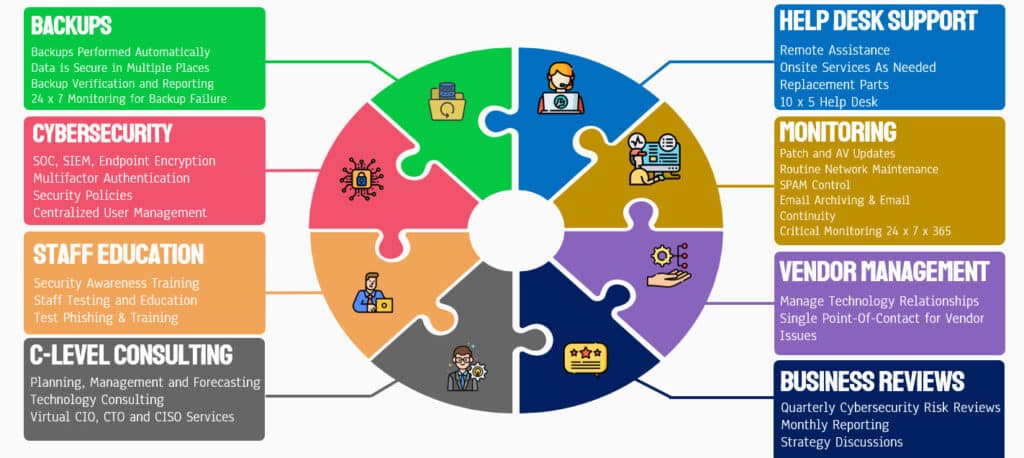
If you hire an IT provider and sign up for a managed IT services contract, here are some things that SHOULD be included (make sure you read your contract to validate this):
Managed IT Support Agreement Includes:
- “Unlimited” remote helpdesk
- Onsite Support As-Needed
- 24x7x365 network and critical device monitoring
- Computer Update and Patch management
- Automated trouble ticket generation
- Spyware scan & removal on desktops
- Spam protection
- Antivirus monitoring
- Data Backup and Recovery Testing
- Vendor management
- Firewall Management
- Project management
- General Password Policies
- Basic Event Logging of Failed and Successful Access
- Secure Remote Access
- File Storage and Group Sharing
- Business Email and Calendar
- Active Directory User and Computer Management or Azure AD (“Entra” Identity Management)
- VoIP Business Phone System
- Asset Tracking and Inventory Management
- Monthly Executive Utilization Reports
Advanced Cybersecurity Protection (Add-On)
- Privilege Access Management
- Data Backup for Cloud Applications or Computer Systems
- Advanced Email Threat Protection
- Microsoft 365 Hardening for Email or Cloud Services
- Advanced Enterprise Level Firewall with Cybersecurity
- Endpoint Detection and Response (EDR / NGAV)
- Data Encryption
- Employee Cybersecurity Awareness Training
- IT Security Policies and Procedures
- Dark Web Monitoring and Scanning
- Web Gateway Security
- Password Management
- Conditional Access Log on
- Mobile Device Management
- Routine Security Assessments
- Quarterly Executive Risk Review
- C-Level Consulting (vCIO, vTCO or CISO)
The following services may NOT be included and will often be billed separately or add-on. This is not necessarily a “scam” or unethical UNLESS the managed IT services company tries to hide these fees when selling you a service agreement. Make sure you review your contract carefully to know what is and is NOT included!
- Hardware Warranty
- Software licenses such as Microsoft 365 or EDR (Nex-Gen Antivirus)
- Onsite Support
- New Hire Setup and Configuration
- Office Setup or Add/Move/Changes
- Phone System Support
- IT Policies and Procedures
- 24 x 7 Security Operations Center
- Security Expert Team On Standby
- Advanced Cyber Threat Hunting
- Machine-learning algorithms examining end user behavior, flagging irregular activity
- Network Segmentation
- Technology “cyber-sweeps”
Warning! Gray areas of “all-inclusive” service agreement. To truly compare the “cost” of one managed IT services contract to another, you need to make sure you fully understand what IS and ISN’T included AND the “SLA” or “service level agreement” you are signing up for. It’s VERY easy for one IT services provider to appear far less expensive than another UNTIL you look closely at what you are getting.
How to Calculate IT Support Cost?
For a business with 11 employees or more, IT support is a crucial investment to ensure smooth operations and data security. This support includes system maintenance, cybersecurity measures, help desk services, data backup, and software updates.
As the business owner, founder, controller, or IT manager, allocating a reasonable budget for IT support is essential:
- to prevent downtime,
- protect against cyber threats, and
- ensure the firm’s efficiency and
- success in the digital era.
Neglecting technology support and cybersecurity can lead to potential vulnerabilities and higher costs in the long run. Thus, viewing IT support as a necessary investment is vital for sustaining your firm’s operations effectively and securely.
According to industry experts and research such as CompTIA, the IT budget for small and medium-sized businesses can range from 5- 7% of revenue. For a company with $1,000,000 in revenue and a 5% IT budget, it’s about $50,000 or $4,1667 per month. The cost may vary depending on location, industry, and regulatory requirements.
At first glance, you may consider this too expensive for your small business. Most small businesses with 10 to 55 users struggle to evaluate, implement, and maintain the right technology to protect their organization. Whether you want to keep your data safe and secure, prepare for cyber insurance requirements, or enable your remote employees to work securely, they all depend on making technology work correctly in the digital age.
For all the benefits that technology brings, it is constantly changing, creating risks of a magnitude never previously imagined.
Things have changed; cyber-attacks are way up! As a business owner and founder, it is crucial to understand the risks your company is facing, address the vulnerabilities, and protect your hard-earned revenue from ransomware. When it comes to risk, “you don’t know what you don’t know.” It is essential to work with an IT provider who can help you and your company manage these risks with our comprehensive IT and cybersecurity services in San Jose and the broader Bay Area, extending our expertise nationwide.
10 key Questions to Calculate your IT Support Cost

- How Many Employees/Contractors Use a computer or mobile device to access your company data and applications?
- Do you have an In-house IT Staff that can provide the basic help desk support??
- How complex is your network environment? (This can a challenging question to answer; it’s not uncommon for a prospect to say that we have a simple IT network, but only for us to find out that the company’s needs are MUCH more complex after an assessment.)
- Do you need onsite and remote support?
- Is your system in the Cloud or On-premise?
- If you have mobile workforce or employees working from home, do you provide company devices?
- Are your software applications or computer systems (PC, server, firewall, wireless) under the manufacturer warranty or support plan?
- How many locations do you have?
- Do you need 24/7 or weekend support?
- Do you have compliance requirements such as HIPAA, CMMC, ISO 27001, or Cyber insurance?
A Final Word and Free Risk Assessment Offer to Show You How to Protect Your Data and Customer Information
We hope you have found this guide helpful in shedding some light on what to look for when hiring a professional firm to outsource your IT support in Silicon Valley. As we stated in the opening of this article, our purpose in providing this information was to help you make an informed decision and avoid getting burned by incompetent or unethical firms luring you in with cheap prices.
Real Clients Reviews and What They Are Saying
 Sue Lompico2023-07-11eSudo has always been responsive and on time. They are knowledgeableMa. Guadalupe Garduno2023-06-22Excellent customer service, very diligentM.R. SCHURR2023-01-30I don't always write a review, but when I do.... it's a good one. Good partners in developing and supporting long-term performance, in-office and remote needs, cybersecurity safety and virtual workspace to take any office to the next level.Matusich Raich Property MGMT2023-01-27eSudo is always friendly, helpful, and quick to respond! They are always there when I need them!Anirudh Muralidhar2023-01-11Smooth interaction and support round the clockStacy Levy2022-12-01Matthew was so helpful and patient: he untangled a multi- layered knots made by years of jury-rigged email systems. And he did it all with deep knowledge and good humorGwen Vasquez2022-11-23Great customer service, fast response, always willing to help! Loved it!Robert Liu2022-08-26There are hundreds of companies in Silicon Valley that offer computer support; it's a commodity service that every IT provider does for small business. What sets Matthew and his team at eSudo apart is they focus on security first, and IT support happens to be part of the security services. He helps small businesses like ours to keep systems up and running, ensure the data is available and the information accessible only by authorized individuals. If you are a small business owner or IT manager concerned with the security of your organization or need reliable, IT support, consider giving Matthew a call or message him.Robbie Starks2021-11-29Matthew and his team are fantastic. They are responsive, ask good questions, and make a strong effort to keep in touch when helping with IT issues. Would definitely recommend them to anyone shopping around for their business.360Medical Supply2021-10-22Very professional team. Will use again. Thanks.










You may also want to look at some of these great resources:
- Is Managed IT Services a Good Fit for Law firms or other small businesses?
- Get Peace of Mind with Our Free Cybersecurity Risk Assessment!
- Do You Know What a Data Breach Could Cost You?